Parameter Storage in Apicize
Requests and Groups are always stored in Workbooks. Parameters including Scenarios, Authorizations, Certificates and Proxies can be stored in Workbooks but also in Workbook Private Parameter files or the Local Vault.
Where you store Parameters depends upon how you want to use these values and who you want to share them with, if anybody.
Types of Storage
Workbook Files
Store parameters in Workbooks along with your Requests when you want to share those values with other developers. When you distribute your Workbook, the parameters will be included. This is useful for demonstration or test values.
You should not store production credentials or sensitive information in Workbooks. You should use one of the following two methods.
Workbook Private Parameter Files
These files are stored along with Workbook files with the extension .apicize-priv. These files can be used to store parameters that you want to keep with your Workbooks but you do not want to share with others.
Note: You should exclude
*.apicize-privin your source control configuration (such as.gitignore) to ensure they do not end up in shared code repositories.
Private Parameter files can be encrypted. See the section on Encryption for more details.
Local Vault Parameter Storage
Any parameters stored in the Local Vault will be available for use by any Apicize workbook loaded into a workspace. This storage is tied to the user logged into the operating system, and is located in your Home directory under .config/apicize. This is a useful mechanism if you work in an enterprise and need to share credentials amongst multiple workbooks.
Vault files can be encrypted. See the section on Encryption for more details.
Resolution of Parameters
Requests, Group and Workbook Default parameters contain both an ID and Name for every configured parameters. If you open a Workbook copied from another system, Apicize will look for parameters with matching names in the Local Vault for any configured parameters, and select them if they match.
If you work in a group and use consistent naming for parameters stored in your Vaults, you can exchange workbooks and parameters will be recognized by name, even if the IDs for Vault parameters between systems are different.
Encryption
Private and Vault parameter files can be optionally encrypted using symmetric (password) encryption. To add or remove encryption from a parameter file, go to the Settings screen and select the Lock panel.
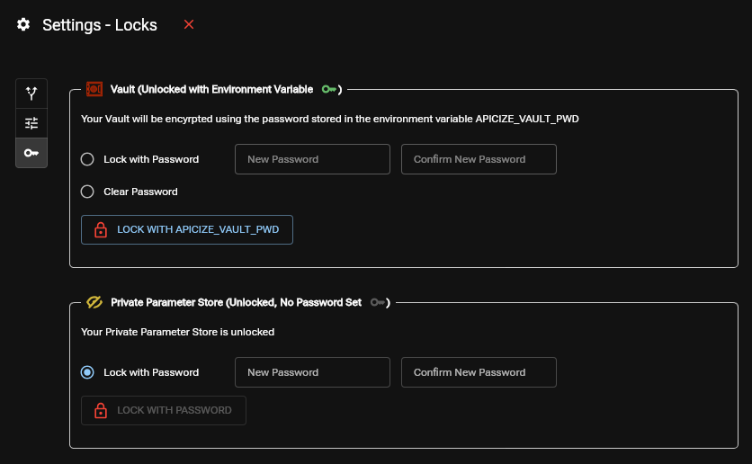
From this screen, you can add, modify or clear passwords from an unencrypted or unlocked file. A parameter file cannot be modified until it is unlocked with the correct password.
Encryption Environment Variables
You can store default Vault and Private parameter passwords using environment variables.
- APICIZE_VAULT_PWD: Default password to decrypt vault parameter files
- APICIZE_PRIVATE_PWD: Default password to decrypt workbook private parameter files
If a parameter file was encrypted using a different password than what is stored in these environment variables, the Settings icon will be colored yellow when you open the workbook, prompting you to enter the correct password.
Environment variables themselves are typically not stored securely unless you are encrypting your home directory, user configuration files, etc.