Integrating with CI/CD and External Testing Frameworks
Apicize CLI Runner
You can download the Apicize CLI runner, apicize-run, that can be used to execute your test scripts with minimal dependencies and no GUI overhead. Visit the link for more information. The utility's arguments are shown below (by running --help).
A few things to keep in mind:
-
You can specify a
globals.jsonfile that contains the parameters (scenarios, authorizations, etc.) required by the script that you are running. Parameters will be matched by either ID or name, which means as long as your organization observes naming conventions, you do not have to worry about specific IDs. -
If you lock either your global parameters or workbook private parameter files, you can either specify the passwords via CLI arguments or use the
APICIZE_VAULT_PWD/APICIZE_PRIVATE_PWDenvironment variables. -
The JSON and CSV reports contain the same information, but the JSON is hierarchical and the CSV contains a row for each test executed.
-
The
--dataargument may be a file name as well as the name of a configured Data Set parameter -
Unfortunately, PKCE OAuth2 authorization flow is not supported in the CLI and will fail
External Testing Tools
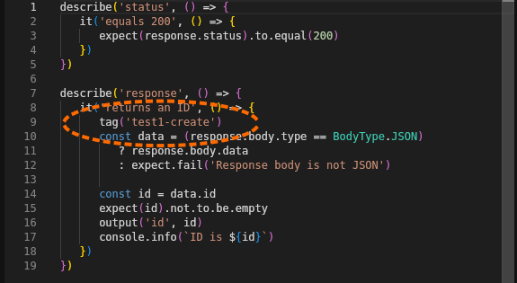
If you are cataloging your test cases using a testing framework, you can include references in your Apicize Requests which will be included in the JSON or CSV reports. Your CI/CD pipeline can use these references to update your testing framework.
Keys can be defined in Requests and Groups to identify testing scenarios, groups of tests, etc. Requests and Groups will inherit the Keys from their parents, and may override them with their own Key definition.
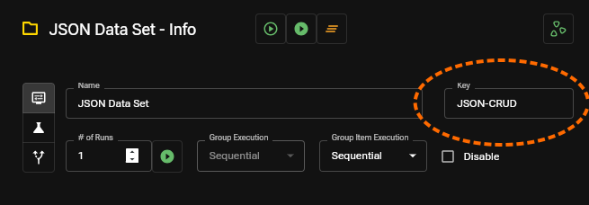
Tags can be defined within a test to identify a specific test.
apicize-run Arguments
$ apicize-run --help
Apicize CLI test runner

Usage: apicize-run [OPTIONS] <FILE>

Arguments:
  <FILE>  Name of the file to process (or - to read STDIN)

Options:
      --runs <RUNS>
          Number of times to run workbook (runs are sequential) [default: 1]
  -o, --output <OUTPUT>
          Name of the output file name for test results (or - to write to STDOUT)
      --report-json <REPORT_JSON>
          File name for JSON report
      --report-csv <REPORT_CSV>
          File name for CSV report
  -t, --trace <TRACE>
          Name of the output file name for tracing HTTP traffic
  -g, --globals <GLOBALS>
          Global parameter file name (overriding default location, if available)
  -d, --data <DATA>
          Name of data set entry, or relative path to seed file from input stream
      --default-scenario <DEFAULT_SCENARIO>
          Default scenario (ID or name) to use for requests
      --default-authorization <DEFAULT_AUTHORIZATION>
          Default authorization (ID or name) to use for requests
      --default-certificate <DEFAULT_CERTIFICATE>
          Default certificate (ID or name) to use for requests
      --default-proxy <DEFAULT_PROXY>
          Default proxy (ID or name) to use for requests
      --private-password <PRIVATE_PASSWORD>
          Password for Workbook private parameter file
      --vault-password <VAULT_PASSWORD>
          Password for Vault global  parameter file
      --validate
          If set, the script and arguments will be validated but tests will not be run
      --no-color
          If set, output will not use color
      --info
          Print configuration information
  -h, --help
          Print help
  -V, --version
          Print version