Settings
Application Settings
Overview
Settings are saved as they are updated.
Display Settings
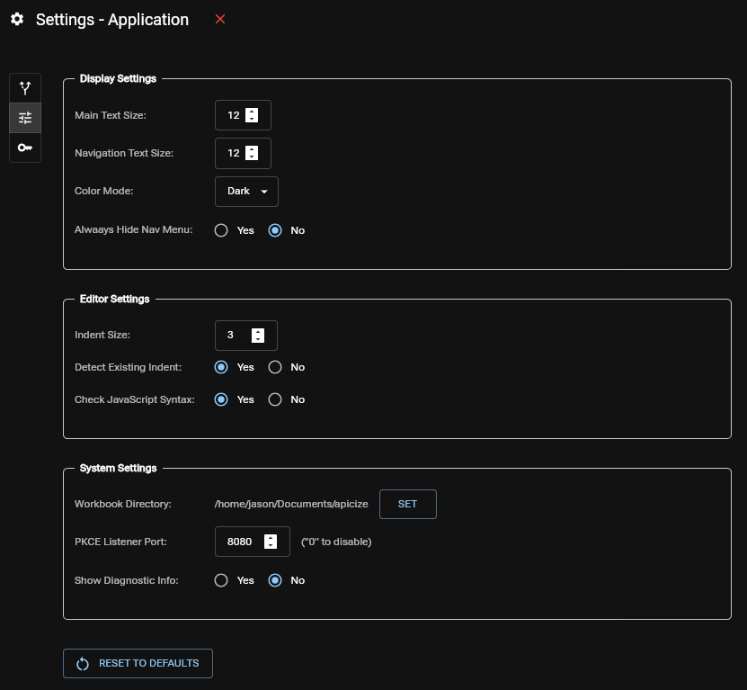
- Main Text Size: This is the base text size for everything that is not the Navigation menu
- Navigation Text Size: This is the base text size for items in the Navigation menu
- Color Mode: Currently Dark and Light modes are available. Don't select Light unless you want your retinas stabbed with a thousand needles (it needs work)
- Always Hide Nav Menu: Set this to "Yes" if you don't want to see the persistent navigation menu, and would rather have the minimized toolbar shown at all times
Editor Settings
- Indent Size: Number of spaces to indent in code editor, unless Detect Existing Indent is set to "Yes"
- Detect Existing Indent: If set to "Yes", Indent Size will be ignored when existing code is loaded
- Check JavaScript Syntax: If set to "Yes", JavaScript (including tests) will highlight any detected syntax issues
System Settings
- Workbook Directory: Sets the default directory for the Workbook file/save dialogs
- PKCE Listener Port: Sets the port which will be used to monitor PKCE callbacks on http://localhost
- Show Diagnostic Info: Setting this to "Yes" will display information like entity IDs that are only interesting to the Apicize developer
Reset to Default
You can use the Reset to Defaults button to revert settings back to installed values. This will also clear the recently opened Workbook history.