Workspaces and Workbooks
An Apicize Workspace is where you set up your HTTP requests to test. You can also configure ways to populate data used by those requests, facilitate authentication, and set up other security measures.
Workspaces are saved to Workbooks. You can control how information is saved to workbooks to lower the risk of unintentionally sharing sensitive authorization credentials or certificates. See the section on parameter storage for more information.
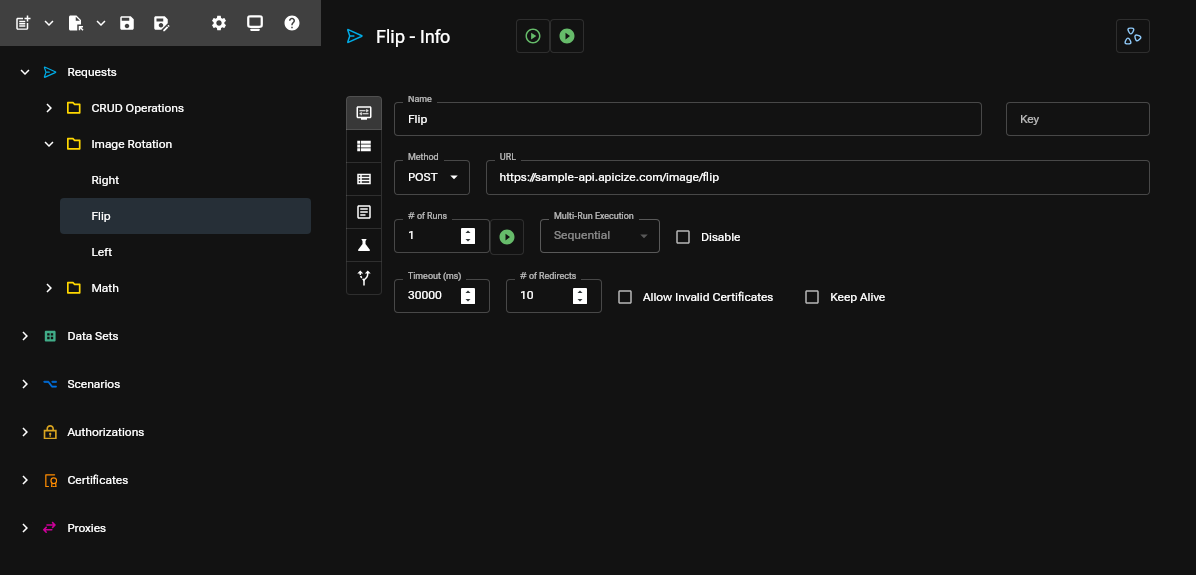
Workspace Elements
Requests / Groups
Information about HTTP calls to send and how to test them
Data Sets
Blocks of data to inject into Requests during testing.
Scenarios
Key-value pairs that can be substituted for Request URLs, headers, body content, etc. using {{handlebars}} placeholders for Keys
Authorizations
Information required to enable authorization based upon API keys, Basic Authentication, OAuth2 Client and OAuth2 PKCE flows
Certificates
Client SSL certificates used for authentication
Proxies
SOCKS5 or HTTP proxies used to connect to HTTP resources
Toolbar
The toolbar at the top left (or left side when navigation is hidden) supports the following functionality
File Operations
- Open new Workbook
- Open existing Workbook
- Save Workspace changes to opened Workbook
- Save Workspace changes to different Workbook